
Setting Up Immich: Self-Hosting Google Photos
August 10, 2026
This post was translated into English by AI. Read the original →
In short: Immich on a Netcup VPS, media on external block storage, everything behind Traefik. Import from Google Takeout via immich-go, backup with Restic to Infomaniak Swiss Backup — and a restore I actually walked through.
This is the second part of my degoogling series. Unlike the mail server, Immich is unspectacular: it has run since March without incident. The interesting part isn't the installation but the import and the backup.
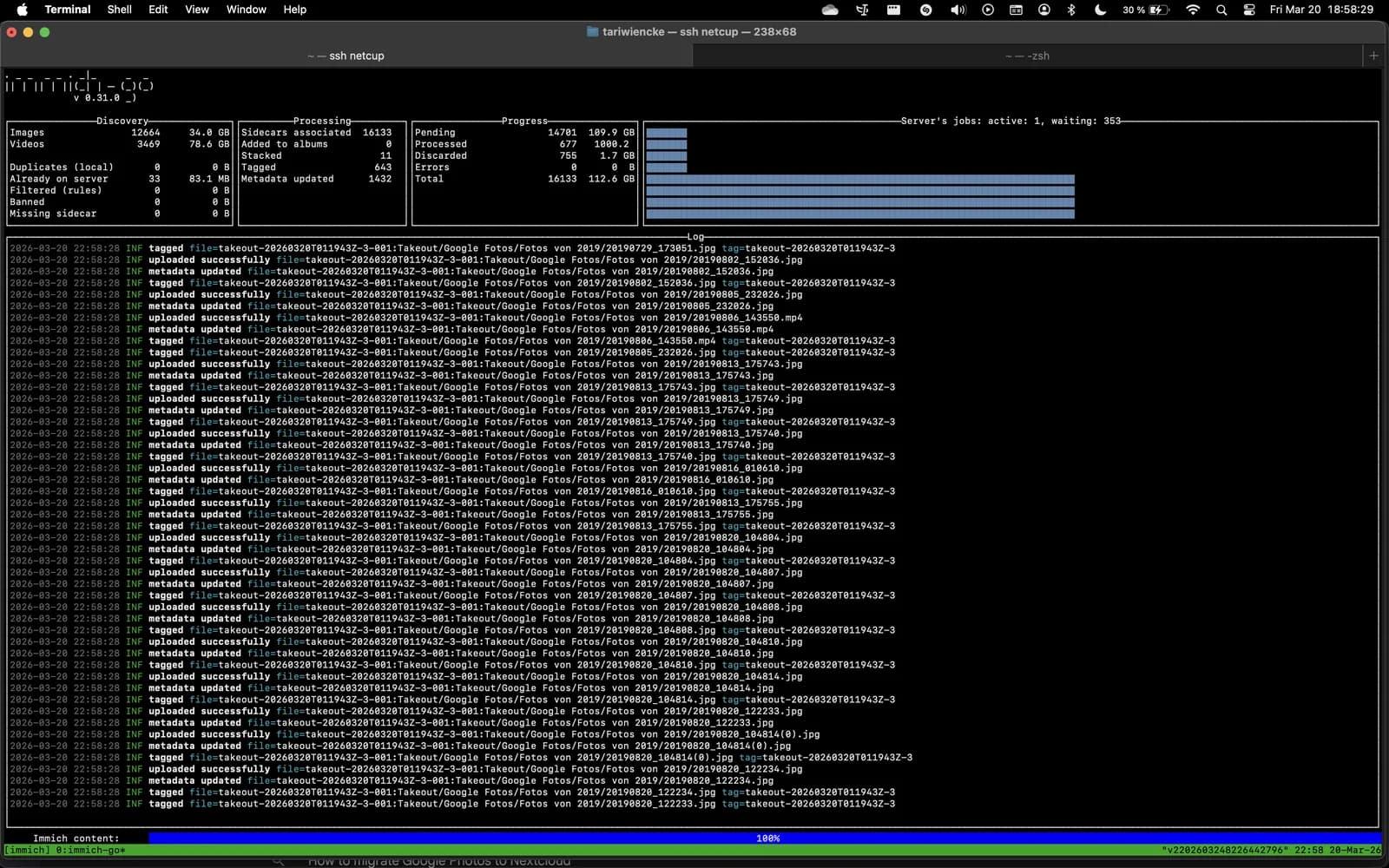
The import in progress: 12,664 images and 3,469 videos from the Google Takeout export, 112.6 GB in total. immich-go shows progress, stacked shots and skipped duplicates live.
1. Why Leave Google Photos
The obvious reason is control over your own pictures. The less obvious one only struck me during the export: I had no idea how many photos I actually had. A service that silently swallows everything also takes away your sense of what it has swallowed.
Then there's the price per gigabyte, which creeps up quietly, and the fact that Google Photos is your only copy if you do nothing else. One account failure — suspended, hacked, accidentally deleted — and ten years of pictures are gone.
What you end up with: photos and videos on your own storage, reachable at fotos.tariwiencke.de, with an encrypted off-site copy in Switzerland. And a restore I tested rather than hoped for.
2. What Is Immich?
Immich is a self-hosted replacement for Google Photos: apps for iOS and Android with automatic upload, a web interface, albums, face recognition, object recognition and full-text search over image content. The features you actually use Google Photos for are almost all there.
Two things worth knowing beforehand:
Immich doesn't modify your originals. It additionally generates thumbnails and transcoded videos for preview, but the original file stays untouched. That's reassuring — but it costs storage, because you effectively keep several versions of the same video.
Object and face recognition run locally, in a dedicated container. No image leaves the server for analysis. In exchange, that container needs noticeable RAM.
3. Architecture: VPS, Docker, Block Storage
                    Internet
                       │  443
                       ▼
              ┌─────────────────┐
              │  Traefik        │  TLS termination, Let's Encrypt
              └─────────────────┘
                       │  traefik-net → port 2283
                       ▼
   ┌──────────────────────────────────────────────┐
   │  immich-server                               │
   │  immich-machine-learning                     │
   │  redis                                       │
   │  database (PostgreSQL with vector extension) │
   └──────────────────────────────────────────────┘
                       │
                       ▼
        /mnt/storage/immich  ← Netcup Local Block Storage
The one decision I'd recommend: the media does not live on the VPS system disk but on separately booked block storage. In the .env:
UPLOAD_LOCATION=/mnt/storage/immich
The reason is banal and important: photos grow. A VPS plan can't have its disk size changed arbitrarily; block storage can. If you create the library on the system disk and have to move it later, you'll be doing that with a stopped service and an uneasy feeling.
One side effect that caught up with me later: if you move the path, Restic treats it as a new location and starts its own snapshot group. The old snapshots under the old path remain as a separate series; restic rewrite cannot change the recorded path retroactively. Thanks to deduplication that costs almost no storage, but the snapshot list looks slightly untidy forever.
4. Installation and Traefik Integration
The basis is the official Compose file. I changed exactly two things about it: networks and labels for Traefik.
services:
  immich-server:
    container_name: immich_server
    image: ghcr.io/immich-app/immich-server:${IMMICH_VERSION:-release}
    volumes:
      - ${UPLOAD_LOCATION}:/usr/src/app/upload
      - /etc/localtime:/etc/localtime:ro
    env_file:
      - .env
    depends_on:
      - redis
      - database
    restart: always
    networks:
      - traefik-net
      - immich-net
    labels:
      - "traefik.enable=true"
      - "traefik.http.routers.immich.rule=Host(`fotos.tariwiencke.de`)"
      - "traefik.http.routers.immich.entrypoints=websecure"
      - "traefik.http.routers.immich.tls=true"
      - "traefik.http.routers.immich.tls.certresolver=myresolver"
      - "traefik.http.services.immich.loadbalancer.server.port=2283"
      - "traefik.docker.network=traefik-net"
No ports: block. The Immich server is reachable exclusively through Traefik; port 2283 is never published on the host. That holds for every service in my setup — whatever isn't in Traefik's entrypoint list can't be addressed from outside, regardless of what a container offers internally.
Two networks. traefik-net is the public edge, immich-net connects the Immich containers to each other. Database and Redis sit on the internal network only.
The .env
# Media on external block storage rather than the system disk
UPLOAD_LOCATION=/mnt/storage/immich

# Database deliberately local — network shares are not supported
DB_DATA_LOCATION=./postgres

# Pinned to a major version instead of :release
IMMICH_VERSION=v2

DB_PASSWORD=XXXXXXXX
On the version pin: Immich moves fast, and release means a casual docker compose pull can roll in a new major version. For a service whose database ships migrations, you want to pick that moment yourself. The pin is the one line that saves you from performing an upgrade while you meant to do something else.
On the database path: DB_DATA_LOCATION deliberately does not belong on a network share — that's stated in Immich's own template and it isn't a suggestion, it's a constraint. Postgres on a network file system is a reliable route to data corruption.
Then:
docker compose up -d
5. Preparing the Google Takeout Export
Request a Google Photos export via takeout.google.com. Two points make the difference:
Choose a large archive size (50 GB instead of the default). Otherwise Google splits the export into dozens of parts, and every single one has to be downloaded before the link expires.
The export is time-limited. The links expire after a few days, and Google caps the number of exports per period. Schedule the download for a day when you genuinely have time.
It's best to download the zip files straight onto the server rather than to your own machine and onward — with several hundred gigabytes that saves an entire transfer leg.
Why Takeout and not the Google Photos API: the Takeout export contains the JSON metadata with the original capture dates, albums and geo coordinates. Via the API you don't get those in full. And it's exactly that metadata the importer needs in the next step, so the images don't all shift onto the import date.
6. Importing With immich-go
immich-go is the tool for bulk import. It understands the Takeout structure including the metadata JSONs and can read directly from the zips — no unpacking needed.
First create an API key in Immich: Account Settings → API Keys.
From Google Takeout
immich-go upload from-google-photos \
  --server=http://localhost:2283 \
  --api-key=<your-key> \
  --client-timeout=120m \
  --manage-raw-jpeg=StackCoverRaw \
  --manage-burst=Stack \
  --manage-heic-jpeg=StackCoverJPG \
  --verbose \
  takeout-*.zip
The three --manage-* flags are why the effort pays off:
| Flag | What it solves |
|---|---|
--manage-raw-jpeg=StackCoverRaw | RAW and JPEG of the same photo are stacked into one entry, RAW as the cover |
--manage-burst=Stack | Burst shots are collapsed into one entry instead of flooding the timeline |
--manage-heic-jpeg=StackCoverJPG | iPhone duplicates (HEIC + JPEG) are stacked, JPEG as the cover |
Without them, every variant lands in the library as a separate image. For a burst of thirty photos that's the difference between a usable and an unusable timeline.
--client-timeout=120m is necessary for large zips — the default isn't enough, and the import otherwise aborts partway.
Important: --server=http://localhost:2283, not the public HTTPS address. The import runs on the server itself, and going through Traefik adds nothing here except another failure mode during hours-long uploads.
From local folders
Photos that weren't at Google — old hard drives, camera exports — I first transferred to the server and then imported.
For the transfer, rclone, and iteratively: images kept being added, and I renamed folders along the way.
rclone sync "/Volumes/tariwiencke/fotos-export" netcup:/mnt/onedrive/ssd \
  -P --track-renames --checksum
--track-renames and --checksum are decisive here. Without them, rclone re-uploads a renamed file in full instead of renaming it server-side. At half a terabyte that's the difference between minutes and a day.
Then the import:
immich-go upload from-folder \
  --server=https://fotos.tariwiencke.de \
  --api-key=<your-key> \
  --folder-as-album=FOLDER \
  --manage-raw-jpeg=StackCoverRaw \
  --client-timeout=120m \
  --verbose \
  /mnt/onedrive/ssd
--folder-as-album=FOLDER turns every folder into an album. If your folder structure carries meaning — by trip, by year, by occasion — that structure transfers directly into Immich instead of being rebuilt by hand.
⚠️ A misconception I want to clear up:
rclonehere is purely a migration tool, not part of the backup strategy. It pushed files onto the server once. The ongoing backup is done exclusively by Restic (chapter 8). That distinction matters, because a copy on the same server isn't a backup.
7. Compressing Videos
Immich doesn't compress originals. With phone videos spanning several years that adds up considerably — and a 4K video of a family dinner doesn't need to be 4K.
Run them through ffmpeg once before importing:
for f in *.MOV; do
  ffmpeg -i "$f" -movflags use_metadata_tags -map_metadata 0 \
    -vf "scale=-2:1080" -c:v h264_videotoolbox -preset slow -crf 23 \
    -c:a copy "out/$f"
done
The two parts that matter:
-map_metadata 0 and -movflags use_metadata_tags carry the metadata over from the source file. Without them you lose the capture date and geo coordinates — and then Immich sorts every compressed video onto the conversion date. You only notice that after the import, and then it's tedious.
-c:a copy leaves the audio track untouched. Audio is small, re-encoding gains almost nothing and costs quality.
h264_videotoolbox is hardware acceleration on Apple Silicon. On other systems use libx264 instead (slower, slightly better compression) or the equivalent for your graphics hardware.
Test on one file first and look at the result. Compression is lossy and irreversible. I only deleted the originals after the compressed versions had been imported and were visible in Immich.
8. Backup With Restic
This is where it gets serious. A self-hosted photo server without a backup is a worse solution than Google Photos, not a better one.
Two parts that belong together
An Immich backup consists of media files and database. The files alone are of little use: albums, face assignments, stacks and metadata live in Postgres. If you only back up UPLOAD_LOCATION, you end up with a folder full of images and no structure whatsoever.
Immich produces the database dump itself. Under System Settings → Database Dump Settings:
- Enable database dumps: on
- Cron expression:
0 02 * * * - Amount of previous dumps to keep: 14
The dumps land in the backups subfolder of UPLOAD_LOCATION — and therefore automatically in the same Restic run as the images. That's why this setup needs no separate pg_dump step.
The backup script
#!/bin/bash

source /opt/immich/.env
source /root/.restic-env

if find "$UPLOAD_LOCATION/backups" -name "immich-db-backup-*.sql.gz" -mtime -1 | grep -q .; then
  echo "DB backup is fresh"

  restic backup "$UPLOAD_LOCATION" --host "netcup" --tag "immich" \
    --exclude "$UPLOAD_LOCATION/thumbs" \
    --exclude "$UPLOAD_LOCATION/encoded-video"

  curl -fsS -m 10 --retry 5 https://hc-ping.com/<your-uuid>
else
  echo "No recent DB backup. Skipping restic."
  exit 1
fi
0 3 * * * /opt/restic/immich-backup.sh >> /opt/restic/immich-backup.log 2>&1
Four decisions in there that I consider the most important:
The find check. If there's no database dump newer than 24 hours, Restic doesn't run at all. Without that condition you'd dutifully back up images for weeks — with a database from last month. A silent, half-broken backup is worse than none at all, because it lulls you into a false sense of safety.
The time gap. Immich dumps at 02:00, Restic runs at 03:00. One hour of buffer so the dump is guaranteed to be finished.
The exclusions. thumbs and encoded-video are recoverable from the originals — Immich regenerates them. Backing them up costs storage and upload time for reproducible data.
The ping only on success. healthchecks.io expects a daily sign of life. If it doesn't arrive — because the dump was missing, Restic failed, or the server is dead — you get a notification. That's a dead man's switch: it reports absence, not errors. Which is exactly why it also works when the server is gone entirely.
Where the backup goes
The target is Infomaniak Swiss Backup as Swift object storage. Selection criteria: a European provider, but geographically separated from the server. A backup in the same data centre is a copy, not a backup.
The credentials live in /root/.restic-env, deliberately outside the Git checkout:
export OS_AUTH_URL=https://swiss-backup04.infomaniak.com/identity/v3
export OS_PROJECT_NAME=sb_project_XXXXXXXX
export OS_USERNAME=SBI-XXXXXXXX
export OS_PASSWORD=XXXXXXXX
export RESTIC_REPOSITORY=swift:sb_project_XXXXXXXX:/netcup
export RESTIC_PASSWORD_FILE=/root/.restic-password
Restic encrypts before uploading. The provider only ever sees encrypted blobs. Even with compromised storage access, the images stay unreadable.
⚠️ The most important sentence in this article:
.restic-passwordis the only key to every backup. Restic has no recovery mechanism for it — no support, no reset, no back door. Without that password the data is mathematically lost.It belongs in a second, independent place. And specifically one that doesn't itself depend on the server: if it only lives in your password manager, and the password manager runs on that same server, you've built a circular dependency that snaps shut precisely in an emergency.
9. Restore — the Part Most People Skip
I walked through the restore before relying on the backup. That's the difference between a safeguard and an assumption.
# 1. Stop Immich
docker compose down

# 2. Restore into a test path, NOT over the production data
restic restore <snapshot-id> --target /tmp/immich-restore

# 3. Point .env at the test path, start the containers
docker compose up -d
4. Import the database through the web interface: Administration → Maintenance → Restore database backup, then select the restored .sql.gz dump. This is an official, documented Immich feature — no manual psql fiddling.
Three things that matter here:
Restore into a test path, never over the production data. A restore test that destroys the working installation is a self-inflicted emergency.
The DB import overwrites the entire database. Immich automatically creates a rollback point beforehand in case the import fails — reassuring, but no reason to get careless.
No version jump alongside the restore. A backup from an older Immich version may need additional database migrations. In a real emergency, restore on the same version first and upgrade afterwards — solving two problems at once rarely goes well.
What my test does not cover, and I'm saying so deliberately: verification was a visual check in the web interface. I did not automatically reconcile whether the asset count matches, all albums are present and no individual file is missing. I'd have seen gross errors, not subtle ones. That's the next step, not a completed item.
10. Maintenance: Prune and Integrity Check
Without cleanup a Restic repository grows without bound. A monthly job handles both — discarding old snapshots and verifying the data:
#!/bin/bash
set -euo pipefail

source /root/.restic-env

restic forget \
  --host "netcup" \
  --keep-daily 30 \
  --keep-weekly 12 \
  --keep-monthly 60 \
  --keep-yearly 100 \
  --prune

restic check --read-data

curl -fsS -m 10 --retry 5 https://hc-ping.com/<your-uuid>
0 5 1-7 * 0 /opt/restic/restic-prune.sh >> /opt/restic/restic-prune.log 2>&1
--prune locks the repository exclusively, hence deliberately outside the daily 03:00 window: first Sunday of the month, 05:00.
restic check --read-data verifies the entire data set, not just a sample. At around 318 GiB that takes a measured 20 minutes — considerably less than I expected. With Infomaniak it's also cost-neutral, because they charge a capacity flat rate without egress fees. With providers that bill outgoing traffic, a monthly full pass would be an expensive habit.
set -euo pipefail makes the script abort immediately on any error — the success ping is then never reached, and healthchecks.io raises the alarm. Same principle as in the backup script: failures must not slip through silently.
A dedicated healthchecks check for this job, not the same one as for the daily backup. Otherwise a green backup run masks a failed prune.
Two lessons from the first run
A misconfigured cron does surprisingly little damage. In my case the backup accidentally ran every four minutes instead of daily for two days — roughly 860 extra snapshots. Cleaning up removed 965 snapshots and freed only about 216 MiB. Restic's deduplication had long since merged the near-identical runs; what was expensive was the bloated snapshot list, not the storage.
Don't start long runs directly in an SSH terminal. A dropped connection during --read-data leaves an orphaned lock in the repository that you then have to release by hand. For the manual first run, prefer nohup … &.
11. Conclusion
What works well: Immich is the least conspicuous service in my setup. The apps upload reliably, search over image content works surprisingly well, and there hasn't been an incident since March. Of all the Google replacements, this was the easiest.
What takes work: the import. Not technically — immich-go works — but because you have to decide beforehand how RAW/JPEG pairs, burst shots and iPhone duplicates get treated. Changing that decision afterwards means starting over.
What I'd do differently: do the compression before the first import, not after. I imported first and only then realised how much space the videos take — and then replaced files that were already in the library.
The real effort isn't in Immich, it's in the backup. The installation is one afternoon. A backup with a tested restore, an off-site copy, encryption and monitoring is a second one. Skip the second and you've replaced Google Photos with something worse — convenient, right up until the one time it matters.
Further Reading
- One VPS, Seven Services, One Repo — the overall setup this service is embedded in.
- My Johnny Decimal System for Files and Folders — what happened to the rest of the Google export.
- Setting Up Stalwart Mail Server — the most demanding service in the same stack.
Sources
- Immich documentation — in particular Docker Compose, environment variables and backup and restore
- immich-go — import tool for Takeout and local folders
- Restic documentation
- rclone —
--track-renamesand--checksum - Infomaniak Swiss Backup: pricing